
Relevanssi helps visitors find relevant content on your WordPress website. But finding the right pages is only part of the job. A visitor may still need to read several results, connect the details and search again before reaching an answer.
You can give those visitors a more direct route. Command Media AI Suite works with Relevanssi to add two experiences: Fast Answers above search results and an AI chatbot for follow-up conversations. Both draw on your site’s content and connect answers to their sources.
What an AI Layer Adds to Relevanssi
Relevanssi improves WordPress search through relevance ranking, configurable weighting and support for content beyond ordinary page text. Its job is to find and rank useful results. An AI answer layer takes the next step: using the retrieved information to compose a response to the visitor’s question.
For example, a training website might explain prerequisites on a course page, assessment rules in a handbook and certification requirements in an FAQ. Search can find those pages. AI can bring the relevant information together into an explanation, with links for checking the details.
This is the distinction behind Relevanssi AI search: retain the search engine that finds your content, then add an answer experience on top. Your website remains the place your team maintains the information.
Add Instant AI Answers Above Your Search Results
You have probably seen an AI-generated summary above a list of search results. Google calls its version AI Overviews; the broader terms include AI answers and AI search summaries. On your own WordPress site, Command Media calls this experience Fast Answers.
Fast Answers present a concise, cited response above your regular search results. Visitors can read the explanation immediately, follow a source link or continue browsing the matching pages below. The answer adds another way to use search without taking away the familiar results list.
Consider a professional association whose visitor asks, “What do I need to qualify for professional membership?” The relevant information might span membership criteria, benefits and application instructions. Fast Answers can use the available content to explain the requirements and point to the pages behind the response. This is an illustrative question; the answer depends on what that association actually publishes.
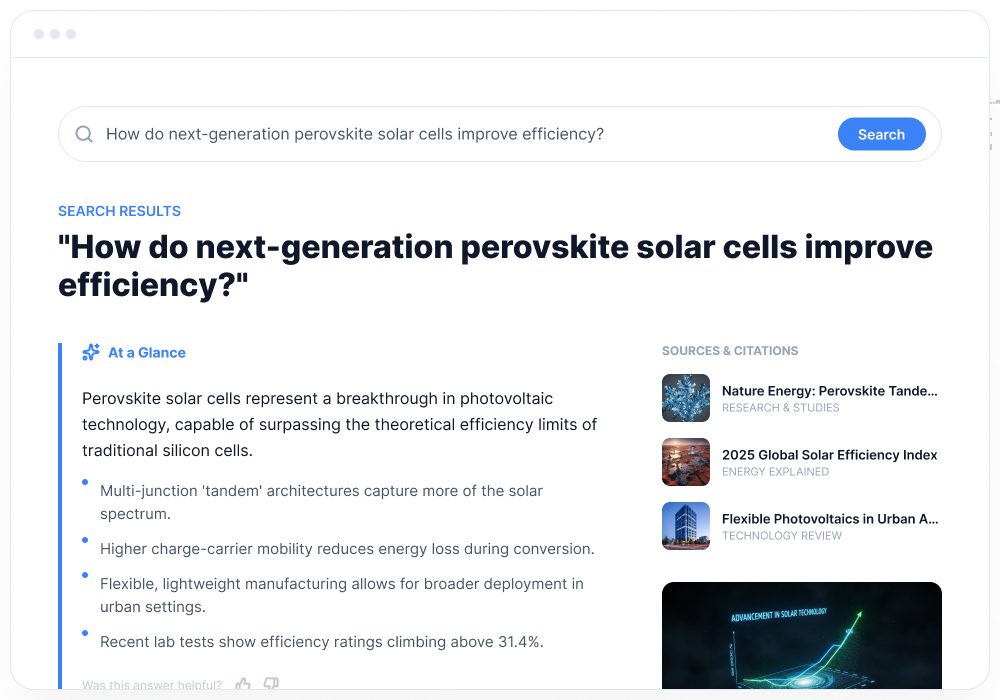
This makes an AI search module useful when visitors want one clear explanation rather than a conversation. It can help them understand a policy, find an instruction or work out which page deserves a closer look.
Add a Chatbot for Questions That Need a Conversation
Other questions unfold over several turns. A visitor starts with a general inquiry, adds a detail and asks for clarification. A WordPress AI chatbot gives them room to do that.
On a software documentation site, someone might ask how to configure an integration, then follow up with, “Does that also apply to the version I’m using?” On an events website, an attendee could ask about registration options and then ask which sessions are included.
Command Media’s chatbot uses the conversation’s context to help retrieve relevant site information and respond to follow-up questions. Source citations give visitors a route back to the original material. We configure its content scope, instructions and appearance around your website and audience.
The practical difference is continuity: visitors can keep exploring an answer without constructing a new search from scratch each time.
Fast Answers or Chatbot? You Can Offer Both
| Visitor’s need | Experience | What it adds |
|---|---|---|
| A quick explanation while searching | Fast Answers | A cited response above regular search results |
| Clarification or several related questions | AI chatbot | A conversation with follow-up questions and source links |
| Different needs across a large website | Both | Quick answers in search and deeper exploration in chat |
You do not have to force every visitor into the same interface. Start with the experience that solves your most common information-finding problem, or combine both through Command Media AI Suite for WordPress.
Seven Places Relevanssi With AI Can Help
The same approach works wherever visitors need to understand published information. These examples show possible uses, with the content sources and scope configured for each site.
Knowledge Bases
A support library may spread an answer across an overview, a setup guide and troubleshooting articles. Fast Answers can bring the key points into search; a chatbot lets the customer ask a follow-up about the step they do not understand. Explore our AI solutions for WordPress knowledge bases.
WooCommerce Stores
Shoppers ask about specifications, differences between products, care instructions and store policies. An answer in search can explain the published details, while a chatbot helps them explore a comparison or clarify a return policy. Our WooCommerce chatbot solution uses the store’s product information and supporting content.
Article and Resource Libraries
A large publishing site may have years of useful material on the same subject. A visitor asking where to begin can receive an explanation drawn from relevant articles, then open the cited sources. Chat makes it easier to narrow the discussion to a particular topic or ask for more detail.
Professional Associations
Prospective members want to understand eligibility, benefits and application requirements. Existing members need renewal information and guidance on available resources. Fast Answers can explain the relevant published rules; follow-up conversations let visitors clarify which membership category or resource fits their stated needs.
Training and Certification Providers
Course descriptions do not always answer every prospective student’s question in one place. AI answers can bring together prerequisites, course coverage and certification requirements. A chatbot can help a visitor explore the differences between programs using the information the provider publishes.
Software Documentation
Developers and administrators often need setup instructions, compatibility details and troubleshooting guidance from different pages. Fast Answers can explain a documented procedure with sources. A chatbot supports follow-up questions about a setting or step, drawing on the documentation available for that question.
Events and Conferences
Attendees look for sessions, registration options, venue details and accessibility information. Search summaries can answer a specific question quickly; chat can help someone explore related details. Keep schedules and event policies current so the assistant has maintained information to retrieve.
Build on the Content and Search Setup You Already Maintain
Useful AI answers start with useful source material. Clear policies, complete instructions and current product or program information give the system something dependable to retrieve. If a key detail is missing from the website, publishing it helps visitors using either search or chat.
Retrieval configuration matters too. Relevanssi’s index, content coverage and weighting affect which information reaches the answer layer. We review the sources and search setup, configure the AI’s instructions and presentation, and test representative questions before launch.
Testing should include short searches, natural-language questions and follow-up conversations. We also check whether citations lead to the material that supports an answer. Continuing review and tuning help address reported answer-quality issues as the site evolves.
Command Media provides implementation and continuing support for this work. You keep maintaining your information in WordPress; we help turn it into a search and chatbot experience suited to the people who use your site.
Relevanssi AI Search and Chatbot FAQs
Does Relevanssi include AI answers or a chatbot?
Relevanssi itself is a WordPress search engine. Its published feature set focuses on finding and ranking content, rather than generating AI search summaries or providing a visitor-facing AI chatbot. Command Media AI Suite adds those answer experiences using relevant content retrieved through Relevanssi.
Do I need to replace Relevanssi?
No. Command Media AI Suite can work with your existing Relevanssi setup. We review the search configuration and content sources during implementation and make adjustments where needed.
Can I use Fast Answers without the chatbot?
Yes. Fast Answers and the chatbot are separate experiences. You can add cited answers to your search results without adding a conversational interface.
Can I use Fast Answers and the chatbot together?
Yes. Fast Answers give visitors a concise explanation during search, while the chatbot supports follow-up conversations. We can implement either experience or both.
Do answers link to their sources?
Yes. Source citations connect generated answers to the underlying website content, so visitors can open the original pages for context and details.
See What AI Answers Could Add to Your Site
If you already use Relevanssi, you have a foundation for helping visitors find your content. Fast Answers and a chatbot can make that content easier to understand and explore.
Request a personalized demo of Command Media AI Suite. Bring a few questions your visitors ask, and we can explore where search answers, chat or both would be useful.
For an existing example of the conversational experience, try the chatbot on our Nolan Film Guide demo. Your implementation would use the content and configuration appropriate to your own website.